Tracker app profile
OneGLP: a private GLP-1 tracker for iPhone
OneGLP is an iPhone and iPad app for logging GLP-1 doses, weight, symptoms, food and progress photos. Records stay on your phone, and you need no account to start. The app used to be called GLPzy.
GLPzy is now OneGLP
GLPzy changed its name to OneGLP. The developer kept the same App Store listing (ID 6761775005), so you have nothing to reinstall. Your records, photos and any Premium purchase carry over. Older reviews and forum posts about GLPzy refer to this app.
What OneGLP does
Log each dose in a couple of taps. Add your weight when you weigh in, and note how the week went. After a few months you have a history to scroll, chart or export. Bring those records to a review with your prescriber, since memory alone gets patchy.
Kept on your phone
Records live on the device. The app has no in-app account, and backups or exports happen only when you make them.
Apple Health, read only
With your permission, OneGLP reads weight, height, glucose, body composition, activity and nutrition from Apple Health. Nothing gets written back.
Your data as a file
The free version exports core records as CSV or JSON. You also get CSV import for an existing dose history.
Inside the app, screen by screen
OneGLP splits into five main areas. Most people spend their time on the first two.
Today
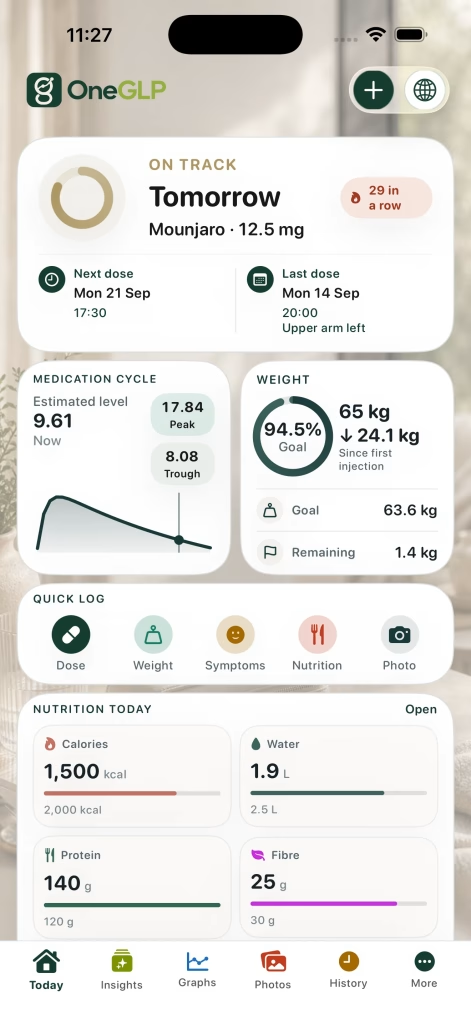
The home screen shows your next dose, your last dose and where you sit in the medication cycle. Your latest weight sits below, with a quick-log button and a running total of today’s food. Recent entries appear at the bottom, so you see at a glance whether this week’s dose went in.
Logging
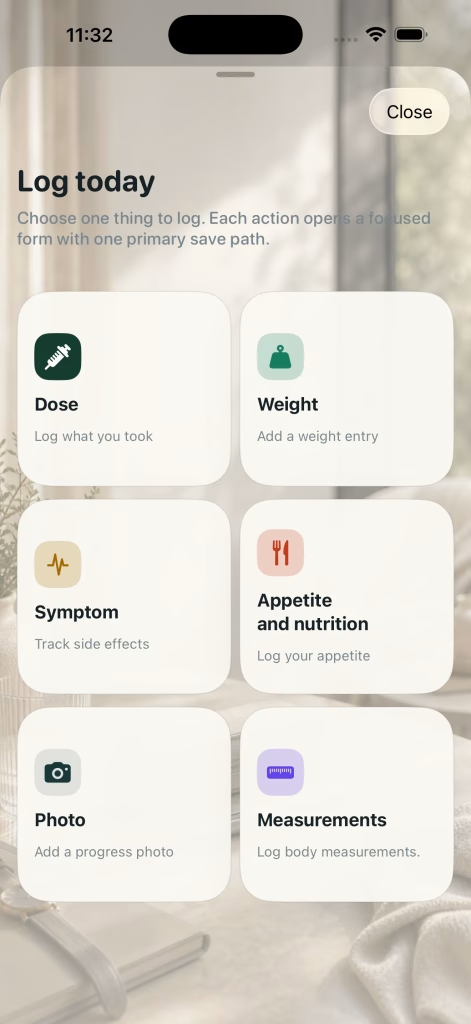
One tap opens the log menu. Pick a dose, weight, symptoms, appetite, a note, food, a progress photo or body measurements. Dose entries also record the injection site. Most entries take a few seconds.
Charts
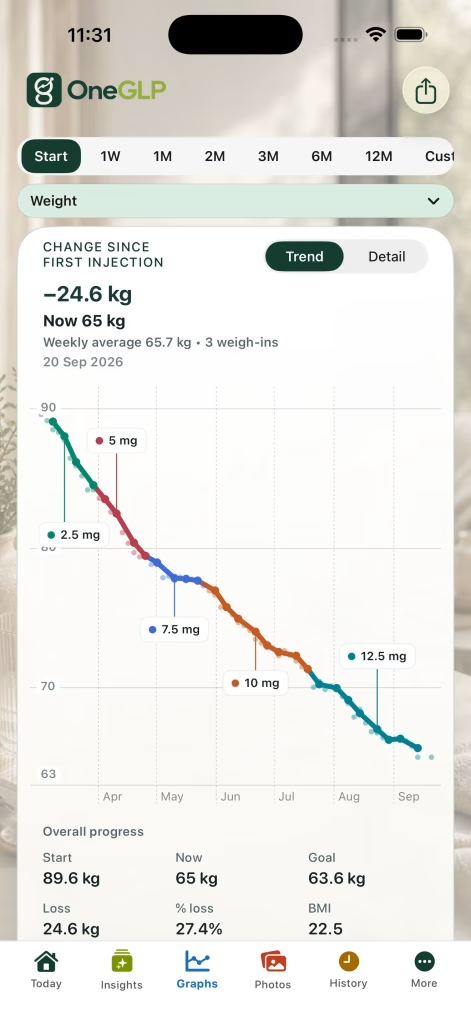
The weight chart marks each dose step along the line, so you see how your weight moved as the dose went up. Separate charts cover schedule coverage, symptoms, BMI, appetite and photos. Overlays add dose bands, a goal line and the Estimated Exposure curve.
Calendar
The calendar shows dose days, weigh-ins and photos by date. The free version covers this month and last month. Premium opens every month, past and future, which helps when a prescriber asks what happened three months ago.
Photos
Progress photos sit beside your weight and dose records. A slider compares two photos side by side. Before you share a before-and-after image, you choose what to show and cover faces if you want. Free users add 2 new photos a month. Premium removes the limit.
OneGLP screenshots
This is what OneGLP looks like on an iPhone. Tap a screen name to flip the phone round, or swipe the phone to move through all six.

Setting up OneGLP
- Download OneGLP from the App Store on your iPhone or iPad. No sign-up screen appears.
- Choose your medicine, dose and start date, then set a reminder time. Custom and compounded profiles sit in the same list.
- Decide whether to connect Apple Health. Say yes and OneGLP reads your weight history and height to fill in your starting point.
- Kept records in another app or a spreadsheet? Import your dose history from a CSV file.
- Log your first dose. The small Next Dose widget on your home screen then shows when the next one is due.
Supply tracking and reorder reminders
Where supported, OneGLP counts the doses you have left and reminds you to reorder. The developer says these reminders are for your own planning and never change dose instructions.
Online pharmacies need time to approve and post an order, so an early reminder helps you avoid a gap between pens. When the reminder goes off, check the Mounjaro discount price list before you reorder. Prices between pharmacies differ by a wide margin for the same dose.
Free or Premium: what you get
The free version covers a normal week for most people. Premium adds a longer look back, a PDF summary for your clinician, and extras such as Apple Watch support.
| Feature | Free | Premium |
|---|---|---|
| Logging doses, weight, symptoms, appetite, food and measurements | Yes | Yes |
| Dose reminders and the small Next Dose widget | Yes | Yes |
| Charts for weight, symptoms, BMI and appetite | Yes | Yes |
| Calendar | This month and last month | Any month, past or future |
| Progress photos | 2 new uploads a month | Unlimited, plus extra montage styles |
| Injection sites | Logged with each dose | Rotation recall and a body map |
| Exports | CSV and JSON of core records | Adds a PDF summary for your clinician |
| Estimated Exposure | Past context on the weight chart | Adds projected scenarios |
| Maintenance mode with a target weight range | No | Yes |
| Apple Watch and larger widgets | No | Yes |
| Changing medicine, route or dosing frequency | Sometimes needs Premium | Yes |
Lifetime Premium is free to claim until 31 December 2026. You claim once, the purchase sits on your Apple ID, and nothing renews. The developer publishes no sterling price for Premium after 31 December, so check the App Store at the time. We took the free and Premium split from the developer’s website on 23 September 2026.
Medicines OneGLP covers
Presets cover Mounjaro, Wegovy, Ozempic, Rybelsus, Saxenda, Victoza, Trulicity and Foundayo, plus general tirzepatide and semaglutide entries. Weekly injections and daily tablets both work. You will also see Zepbound, the US brand name for tirzepatide. In the UK, tirzepatide comes as Mounjaro.
The app has custom and compounded profiles too. Logging a product in an app does not make the product a licensed treatment. In the UK, you get licensed GLP-1 medicines from a registered pharmacy with a prescription.
Privacy and who runs OneGLP
Steven Good publishes OneGLP as a sole trader, with a postal address in St Albans, Hertfordshire. You deal with one independent developer rather than a large company. Some people prefer a small developer. Others want more people behind an app holding their health records.
The developer reports more than 10,000 downloads and a US App Store rating of 4.7 or above, checked on 8 September 2026. We have seen no UK breakdown, and store ratings move fast.
- No in-app account to start.
- Records stay on the device. Backups and exports are files you create yourself.
- Apple Health access is optional and read only.
- The developer publishes privacy, data rights, medical safety and methodology pages.
- These points come from the developer. Monj has not audited the app’s security.
Who OneGLP suits
OneGLP suits an iPhone user who wants a detailed, private log without signing up for another account. The free version handles a normal week without fuss. On Premium, the PDF summary helps most at a review appointment. Lifetime Premium costs nothing until 31 December, so claim the offer before then.
Android users are out of luck for now. Glapp and Augo both run on Android as well as iPhone. For serious food logging, pick a specialist food app. Our tracker apps comparison lines up every option side by side.
OneGLP questions
Is OneGLP free?
Yes. Core tracking is free. Premium adds a longer history view, a PDF summary for your clinician and a few extras. Lifetime Premium is free to claim until 31 December 2026 and never renews.
Is OneGLP the same as GLPzy?
Yes. Same app, same developer and same App Store listing under a new name. Records and purchases carry over.
Is there an Android version?
No. OneGLP runs on iPhone and iPad, with an Apple Watch companion on Premium.
Do I need an account?
No. You start logging without creating an in-app account.
Does OneGLP tell me what dose to take?
No. OneGLP keeps records. Estimated Exposure comes from a model, and your prescriber decides your dose.
Does OneGLP work with Mounjaro and Wegovy?
Yes. Both have presets, alongside other GLP-1 medicines and custom entries.
Check the current listing
Features and prices change with updates. Read the App Store page and the privacy policy before you download.
© 2026 Medstack Ltd. Written and published by Monj (monj.co.uk). You are welcome to link to this page or quote a short extract with a credit and a link. Republishing the text, page structure, safety-routing design or price data, in whole or in part, including to train or ground an automated system, is not permitted without written permission. See our independence statement and editorial and review policy.
Sources referenced on this page
Standing primary references for every Monj page:
- Mounjaro (tirzepatide) Summary of Product Characteristics and Patient Information Leaflet, electronic medicines compendium
- MHRA Drug Safety Update: GLP-1 receptor agonists
- NICE TA1026: tirzepatide for managing overweight and obesity
- General Pharmaceutical Council register of pharmacies
- MHRA Yellow Card scheme